Next generation of edge computing: AI, microservices and container orchestration
Nvidia Jetson, Kubernetes, CUDA, arm64 and Tensorflow to boost your AI projects and edge analytics
Part 1 : Development of an AI with Keras and Tensorflow and optimization with CUDA and TensorRT (steps 1 & 2)
Part 2 : Deployment as a containerized microservice in Kubernetes with GPU acceleration support on the Nvidia Jetson Nano and performance monitoring (steps 3 & 4)
Current edge IoT / computing solutions are now offering some great integration capabilities both for the field devices and the cloud platform vendors. They create the bridge we need to integrate heterogeneous protocols, design our business logic without dealing with the specifics and offer in the meantime the necessary connectivity to consolidate our data in some business-oriented dashboards containing our KPIs in the Cloud.
But as the volume of data we need to crunch continuously increase, pushing back to the cloud this huge amount of traffic is not optimum in term of cost and decision taking time response.
Also, for critical assets it is obvious that the cloud integration, especially with public ones, is a big security concern. Even with a proper architecture design, it is not possible to completely prevent the risks and a local processing is always preferable for critical processes when possible.
The new generation of edge controllers is tackling those challenges by both hardening the security in the lowest layers (e.g. secured encrypted boot) and embarking GPU co-processing to facilitate the AI Deep Learning models computation. Therefore, the data processing and decision taking can safely be done close to the assets, on-premise.
In this article, I will talk about the approach I chose and the challenges I faced regarding the deployment of AI models as containerized microservices with CUDA acceleration support using orchestration technology like Kubernetes on edge devices.
In order to be more concrete, I will illustrate this with the example of a homemade AI that perform image classification to detect cracks on walls at the edge device level.
At first, we will see how the model is created, then we will deploy the AI in a containerized microservice on top of Kubernetes.
The whole stack will be running on a Nvidia Jetson Nano platform so we will be able to run the inferences with CUDA GPU acceleration.
As it wasn’t straight forward to get there, let me tell you a little more about my own experience in this journey.
Step 1: Building an AI model with Keras and Tensorflow
The example I will talk about here, is an AI that perform wall cracks detection.
To do so, I’ve been using Keras and Tensorflow to build a homemade Convolutional Neural Network (CNN) that is digesting as an input an image and give as a result another image pinpointing the cracks plus a JSON metadata file with some metrics (inference execution time, number of slices analyzed, etc.).
Such a model could be used for example to do (near) real time detection for:
- Audit on site to check whether a building / infrastructure is safe before a rescue team can operate
- Automate the on-going commissioning tasks on site and trigger some alarms if new cracks are detected in the inspection zone to intervene quickly and do pro-active maintenance
- Perform automatic fixes with robots, etc.
But before all as a disclaimer, my goal here is not to explain how to build a state-of-the art model to perform this type of classification. So as a reference I am adding some links to other Github repositories and scientific publications if you are interested to build your own.
More precisely, I have created a CNN binary classifier that can detect if a wall surface is sane or cracked. Here below is the model layout structure I have chosen. I got some inspiration from this scientific publication published by researchers from the University of Manitoba and the Massachusetts Institute of Technology.
Model saved to:  ../models/wall_cracks_detector.h5
_________________________________________________________________
Layer (type)                 Output Shape              Param #
=================================================================
conv2d_1 (Conv2D)            (None, 126, 126, 32)      896
_________________________________________________________________
max_pooling2d_1 (MaxPooling2 (None, 63, 63, 32)        0
_________________________________________________________________
conv2d_2 (Conv2D)            (None, 61, 61, 32)        9248
_________________________________________________________________
max_pooling2d_2 (MaxPooling2 (None, 30, 30, 32)        0
_________________________________________________________________
conv2d_3 (Conv2D)            (None, 28, 28, 64)        18496
_________________________________________________________________
max_pooling2d_3 (MaxPooling2 (None, 14, 14, 64)        0
_________________________________________________________________
flatten_1 (Flatten)          (None, 12544)             0
_________________________________________________________________
dense_1 (Dense)              (None, 128)               1605760
_________________________________________________________________
dropout_1 (Dropout)          (None, 128)               0
_________________________________________________________________
dense_2 (Dense)              (None, 128)               16512
_________________________________________________________________
dropout_2 (Dropout)          (None, 128)               0
_________________________________________________________________
dense_3 (Dense)              (None, 1)                 129
=================================================================
Total params: 1,651,041
Trainable params: 1,651,041
Non-trainable params: 0
CNN model built with Keras to create a binary classifier
Note: This model is generic and can be used to perform any type of binary classification. For example, I have tested it to classify droids like R2D2 and BB8 🤖
But if you want to play with some ready to go models you can have a look here: https://github.com/topics/crack-detection
To train our model we need to have a proper dataset. To do so I performed this using public data from Google images, but better results can probably be obtained using some cleaner dataset like this one provided by Mendeley. Again, my goal here is not to build the “best” model ever to perform this specific kind of analytic.
Let’s have a look at what we can see once the training is finished.
1/9 [==>...........................] - ETA: 5s - loss: 0.2204 - acc: 0.9375
2/9 [=====>........................] - ETA: 5s - loss: 0.2284 - acc: 0.9062
3/9 [========>.....................] - ETA: 5s - loss: 0.1703 - acc: 0.9375
4/9 [===========>..................] - ETA: 4s - loss: 0.1703 - acc: 0.9453
5/9 [==============>...............] - ETA: 3s - loss: 0.2097 - acc: 0.9375
6/9 [=================>............] - ETA: 2s - loss: 0.2746 - acc: 0.9167
7/9 [====================>.........] - ETA: 2s - loss: 0.3190 - acc: 0.9018
8/9 [=======================>......] - ETA: 1s - loss: 0.2886 - acc: 0.9141
9/9 [==========================>...] - ETA: 0s - loss: 0.2961 - acc: 0.9132
10/9 [==============================] - 9s 866ms/step
loss: 0.2869 - acc: 0.9156 - val_loss: 0.3120 - val_acc: 0.9375
Training of the model, latest epoch result reach 0.93 accuracy value.
Even with the small custom dataset I built (around 1600 pictures of cracked and none cracked concrete wall surfaces at 128x128 pixels resolution), this is actually not that bad. I also used Keras pre-processing image data generator to artificially increase the dataset and prevent overfitting.
At the end, we obtain a model that we will transform into a frozen graph. You can refer to this article on Medium as an example to to do so.
In the next section, we will re-load it and setup the session configuration options with the GPU acceleration on the Jetson and I will explain how to optimize it with TensorRT to make the inferences even more efficiently.
To perform the analytic, I also wrote some extra Python code to create a scanner which uses a sliding window to explore the image and make the inferences. We can see the result of the process below.
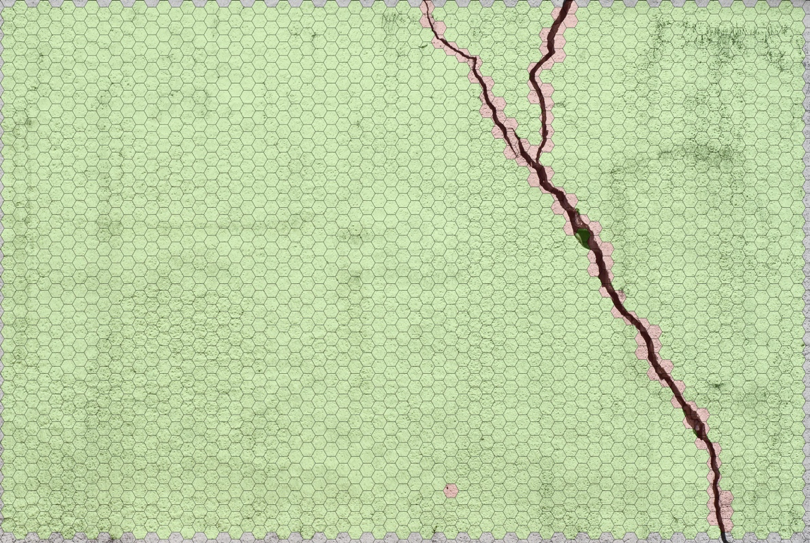
Note: The hive effect is a purely stylistic effect 😃 as the input layer take a 128x128 matrix. The external outbound of the hexagon is used in this case.
Now let’s jump into the next section and see how to get an optimized model for our Jetson Nano edge computing device.
Step 2: AI model inferences boosted with CUDA and TensorRT for the Nvidia Jetson
Now that we have our model, some code to bootstrap it and we can do the inferences on our images; it is time to think about how we can optimize it in order to be able to deploy it on the edge device.
Indeed, using only the CPU would result in poor performance on such device and would most likely disturb the behavior of the other processes running on it. To prevent this, the computation load can be shifted to the GPU unit that is much more performant for this type of calculation used for the Deep Neural Networks (DNN).
To do so, we will use the Compute Unified Device Architecture (CUDA) libraries developed by NVIDIA included in the Jetpack SDK to take full advantage of the Jetson computational capabilities.
Tensorflow and CUDA
The libraries provided by Nvidia include all the necessary resources to exploit this with the Tensorflow GPU support.
The important point here is to load the Tensorflow session with the GPU options enabled properly to run the inferences efficiently.
TensorRT optimizer
To cite Nvidia documentation:
“TensorRT will parse the model and apply optimizations to the portions of the graph wherever possible.
The core of NVIDIA TensorRT is a C++ library that facilitates high performance inference on NVIDIA graphics processing units (GPUs). TensorRT takes a trained network, which consists of a network definition and a set of trained parameters and produces a highly optimized runtime engine which performs inference for that network.”
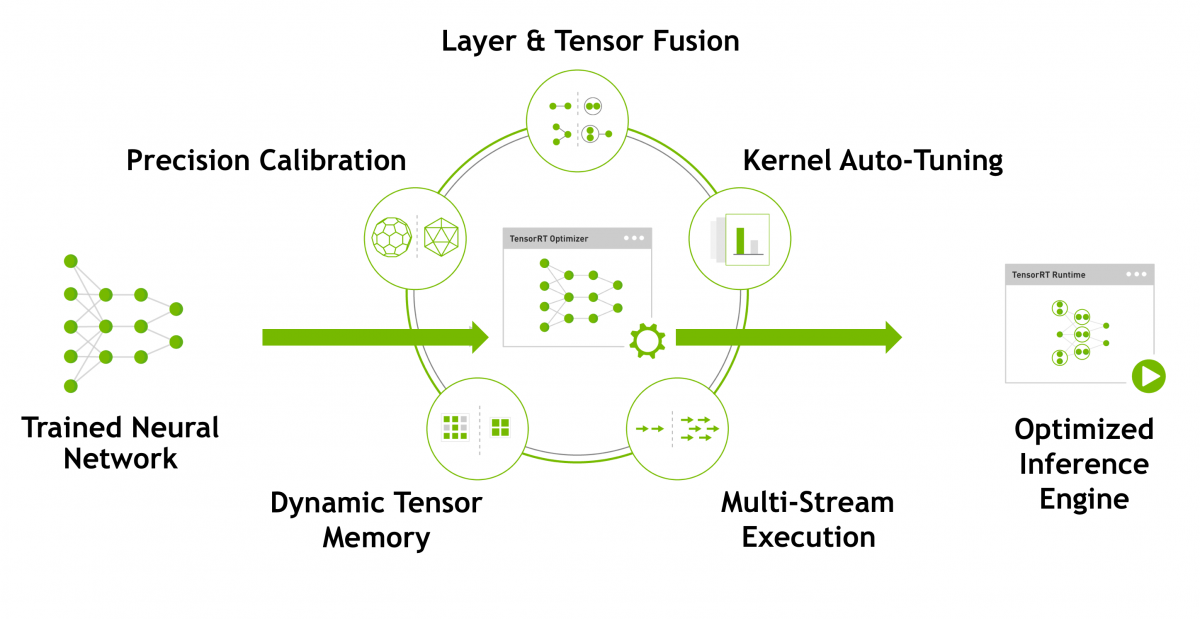
To know more about TensorRT available optimizations
So, at this stage we have a Tensorflow optimized graph running with CUDA acceleration support, but we are still at the host level. The next step will be to build a containerized microservice orchestrated with Kubernetes to deploy this AI.
Step 3: Deployment of the AI as a containerized microservice on Kubernetes
At this point of the development I have designed the microservice that contain the AI as a simple API that can be called by the other microservices in the application stack deployed in Kubernetes.
The endpoint is a Web-socket taking images as an input and sending back the result as an image (as seen above in the first section) and a JSON metadata file.
But to get the inferences done with the CUDA GPU acceleration from the container we need to build our Docker images with the right dependencies and expose in Kubernetes the necessary resources to access the Jetson hardware specifics.
Challenges
- CUDA base image to give acceleration support with Tensorflow and TensorRT
- Kubernetes tuning to get access to the GPU from the Pod for the AI
Solutions
- Build custom CUDA base image for ARM64 for the Jetson Nano
- Create the Pod definition with the necessary mounting points and privileges level
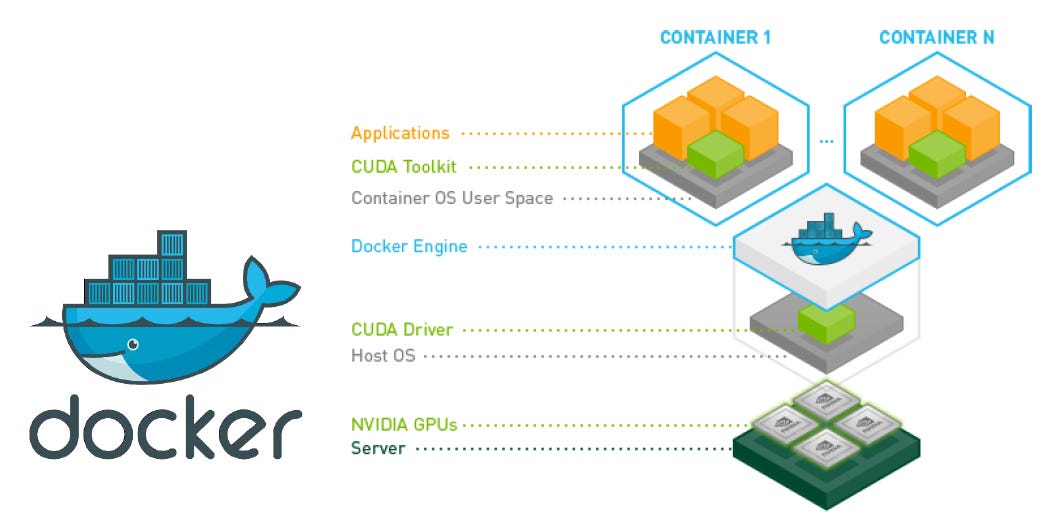
NVIDIA provide some support for this especially for Cloud GPU platforms but at the time we were developing this, Nvidia didn’t yet provided the support for its Tegra based devices. So, we have developed a community edition cuda base image for Tegra you can access from our Git repository.
This image doesn’t contain the proprietary Nvidia packages, but you can recompile the Docker image once you have downloaded them from the Jetpack. The instructions are in the README file in our repository if you want to know more about how to do it.
In order to deploy our AI microservice as a Pod in Kubernetes we are re-using the same approach as what Nvidia is offering for x86 / amd64 architecture with Docker but we have added some extra mounting points to access the hardware resources from the host.
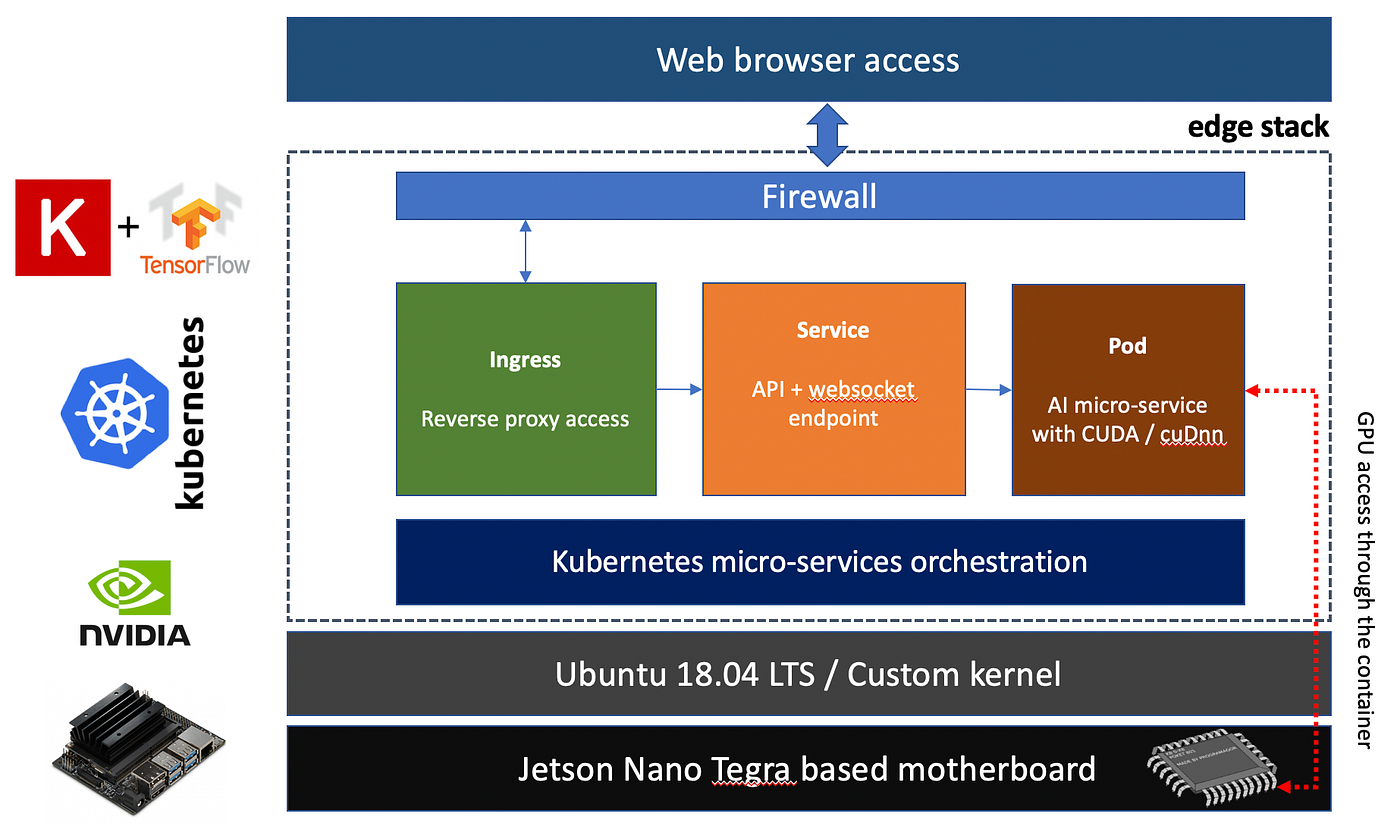
Finally here it is 🎉 ! We have deployed our AI as a container that can be orchestrated, deployed and updated as our other microservices.
Step 4: Performance monitoring / GPU usage
In this last part, I will just give some quick insights about how we could verify that the GPU is effectively exploited by the AI running in our microservice deployed on Kubernetes.
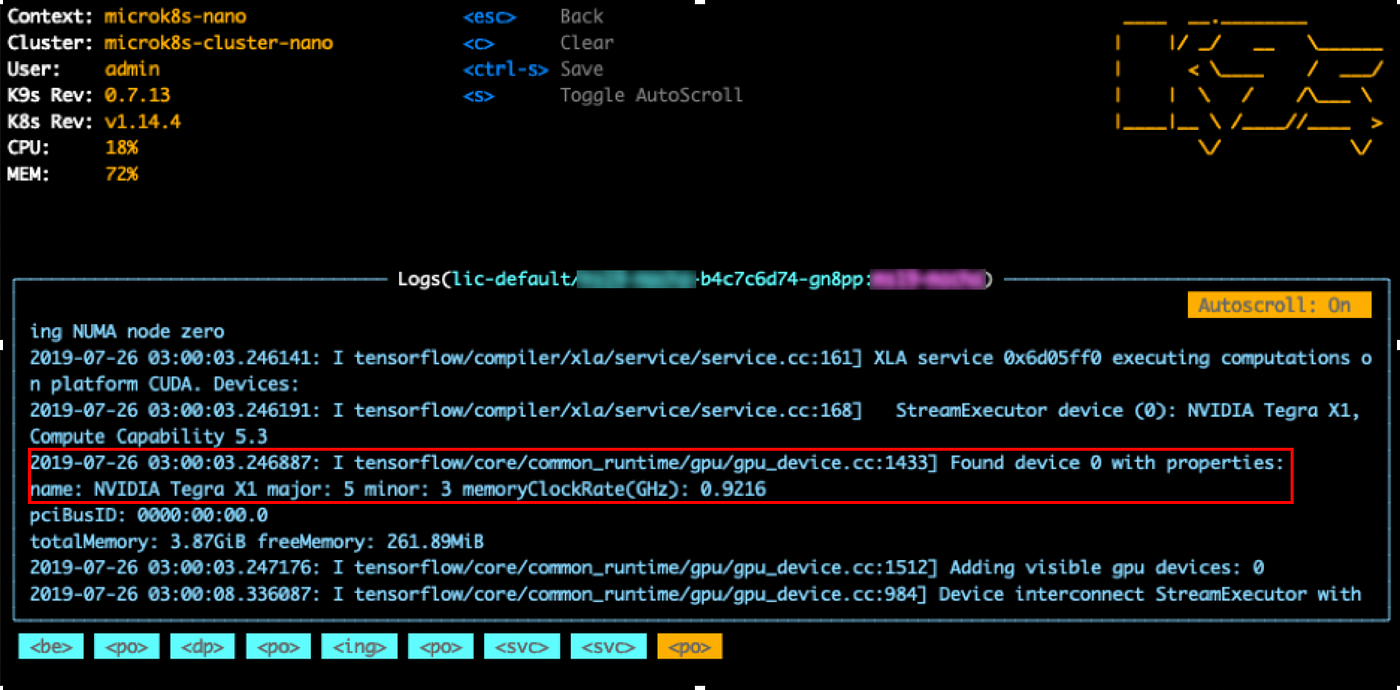
At first, we can check the logs of the Pod and see that Tensorflow is using the Tegra X1 GPU unit.
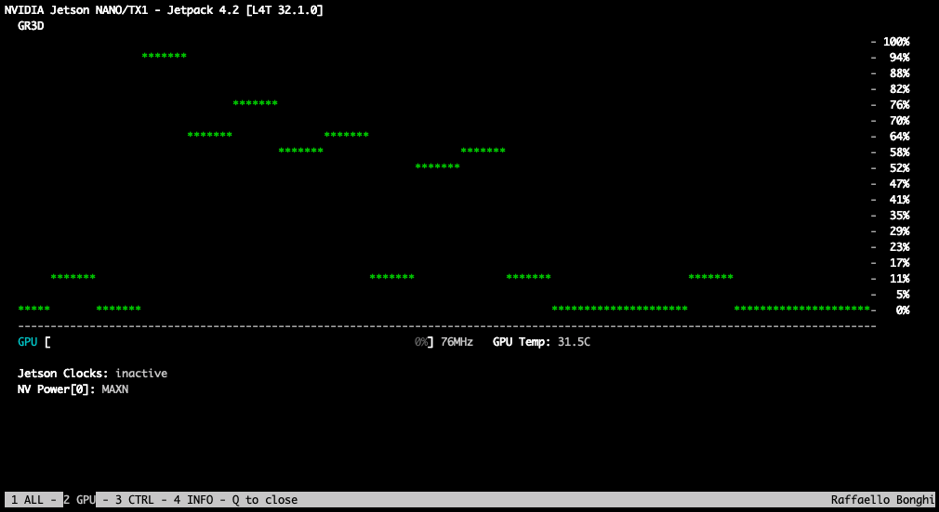
Then, we could also verify and confirm that the GPU consumption is increasing significantly when we were performing the inferences.
And most importantly, we could check either that the examples provided by Nvidia were running with the performance announced by them for this platform when testing with a containerized Jupyter Notebook based on our CUDA optimized Docker base image.
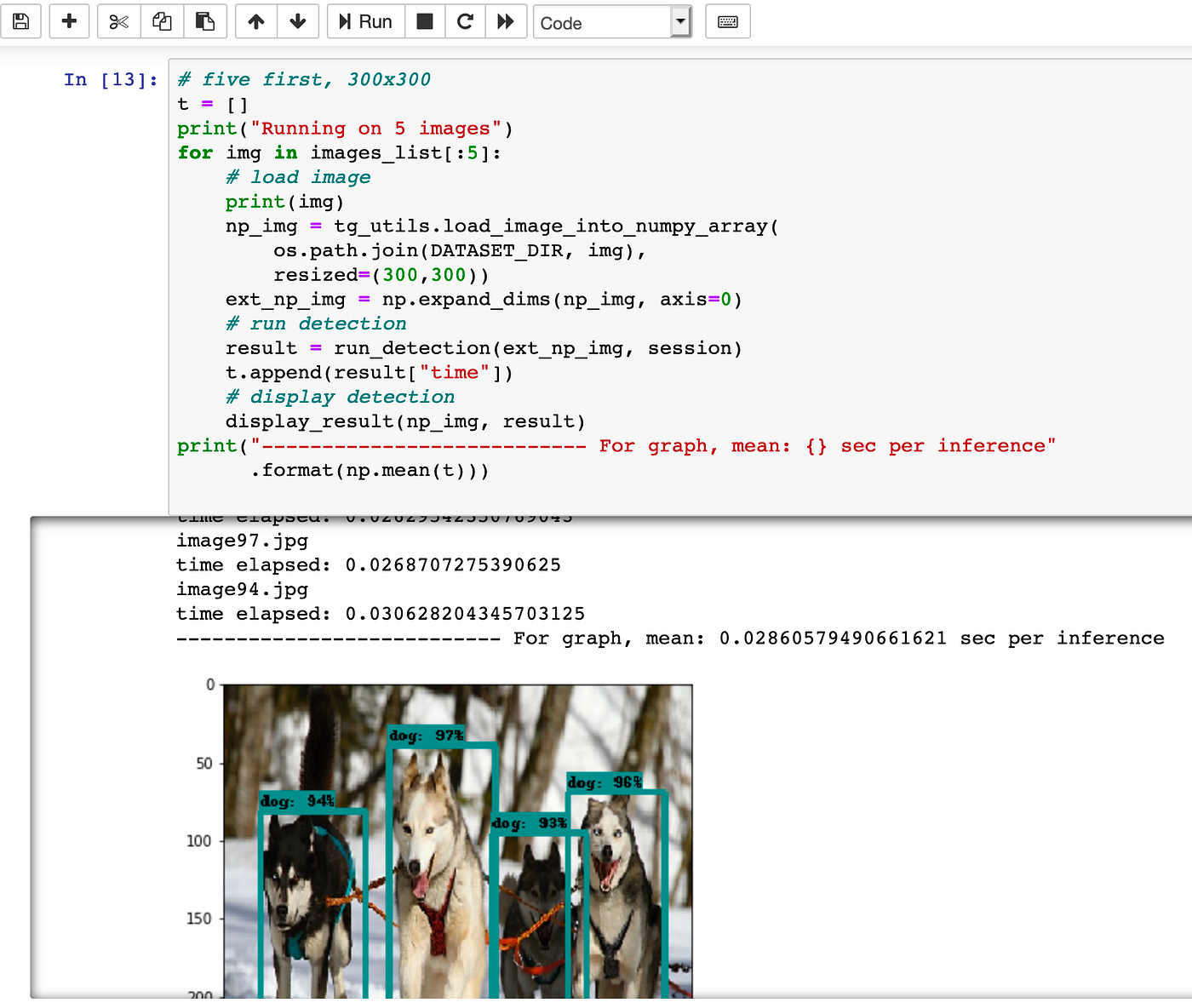
This notebook comes from Nvidia Github repository using for this example Mobilenet V1 with TF-TRT.
Conclusion
Nvidia provide easy to go tools to quickly develop on those Jetson platforms at the host level but in order to keep our application stack consistent the integration of the CUDA based microservices on top of Kubernetes was challenging.
We could validate the approach and the performances are similar to what we could get on the host directly.
And so, this is a very important step as it will greatly facilitate the deployment of new AI models while keeping the same integration logic as discussed in this previous article: “Is Kubernetes the next big game changer for the IoT edge controller industry?”.
Thank you very much if you have read that far ! 🎊
If you have any comments, experiences to share in this field I would be happy to hear from you!